> For the complete documentation index, see [llms.txt](https://wiki.astrawireless.net/astra-wireless-documentation/llms.txt). Markdown versions of documentation pages are available by appending `.md` to page URLs; this page is available as [Markdown](https://wiki.astrawireless.net/astra-wireless-documentation/technical-documentation/astrawireless-quasar-technical-user-manual/operation-and-administration/general-settings.md).

# General settings⁣⁣⁣⁣⁣

The "General" section allows to configure basic system parameters, described in the table below.

### Device <a href="#generalsettings-unit" id="generalsettings-unit"></a>

These parameters are used for identification and link authorization.

<figure><img src="https://2734851754-files.gitbook.io/~/files/v0/b/gitbook-x-prod.appspot.com/o/spaces%2FnG7V17JtC1mMJOmveKc6%2Fuploads%2FVU0AjkLMY8GjXu8EfTwW%2Fimage.png?alt=media&amp;token=cf2ee5da-c126-40a5-a333-14785b042b05" alt=""><figcaption></figcaption></figure>

<table><thead><tr><th width="171">Parameter</th><th>Description</th></tr></thead><tbody><tr><td><strong>Device Name</strong></td><td>The arbitrary wireless unit name which will be used by network administrators for unit identification. It will be shown in Web GUI side panel.</td></tr></tbody></table>

### SNTP <a href="#generalsettings-sntp" id="generalsettings-sntp"></a>

Starts the SNTP time synchronization service. For proper operation, specify the SNTP server time zone and the IP address first. By default, the SNTP service is disabled.

<figure><img src="https://2734851754-files.gitbook.io/~/files/v0/b/gitbook-x-prod.appspot.com/o/spaces%2FnG7V17JtC1mMJOmveKc6%2Fuploads%2FRKo1TNIvgeabYsyfCh3B%2Fimage.png?alt=media&amp;token=ae03315f-7de6-44e5-876f-3db3b62a6ba8" alt=""><figcaption></figcaption></figure>

<table><thead><tr><th width="167">Parameter</th><th>Description</th></tr></thead><tbody><tr><td><strong>SNTP Server Address</strong></td><td>The SNTP server IP address, the SNTP service will synchronize the time on the device with. The device must have network access to the SNTP server.</td></tr><tr><td><strong>Time Zone</strong></td><td>The time zone at the place of device installation. For example: GMT + 5.</td></tr></tbody></table>

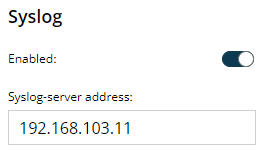
### Syslog <a href="#generalsettings-syslog" id="generalsettings-syslog"></a>

<figure><img src="https://2734851754-files.gitbook.io/~/files/v0/b/gitbook-x-prod.appspot.com/o/spaces%2FnG7V17JtC1mMJOmveKc6%2Fuploads%2FRi6THcOryms3C5vaHBzG%2Fimage.png?alt=media&amp;token=8f834441-6f2d-4f17-aa3f-0e7596788f61" alt=""><figcaption></figcaption></figure>

Allows to transmit syslog data to the server using the "syslog" protocol. Specify the syslog server address where data should be transmitted.