> For the complete documentation index, see [llms.txt](https://wiki.astrawireless.net/astra-wireless-documentation/llms.txt). Markdown versions of documentation pages are available by appending `.md` to page URLs; this page is available as [Markdown](https://wiki.astrawireless.net/astra-wireless-documentation/technical-documentation/astrawireless-quasar-technical-user-manual/operation-and-administration/mint-settings.md).

# MINT Settings

The "MINT settings" section is intended for the MINT protocol configuration. You can find a description of the MIINT technology in the [article](https://wiki.astrawireless.net/astra-wireless-documentation/white-papers/mint-technology).

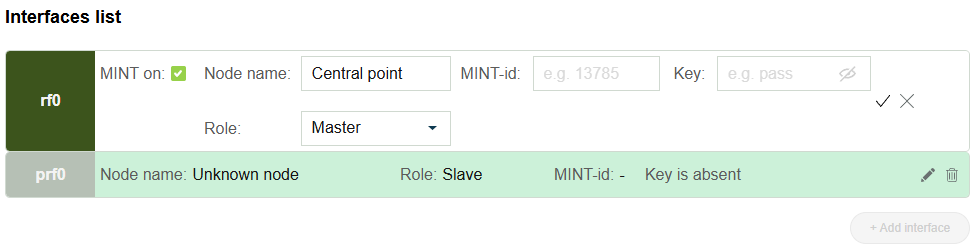
"Interfaces list" section allows to configure MINT (radio and pseudo-radio) interfaces parameters. Radio interface is created by default and can not be deleted. To perform settings of the previously created pseudo-radio interface click "Add interface" button and select the desired interface.

<figure><img src="https://2734851754-files.gitbook.io/~/files/v0/b/gitbook-x-prod.appspot.com/o/spaces%2FnG7V17JtC1mMJOmveKc6%2Fuploads%2FCMBXaDLxthFIWbQvOWP5%2Fimage.png?alt=media&amp;token=e07a3823-9e8b-4fc3-ad74-5dfdfdf481ad" alt=""><figcaption></figcaption></figure>

Following parameters are available to configure:

<table><thead><tr><th width="165">Parameter</th><th>Description</th></tr></thead><tbody><tr><td><strong>MINT on</strong></td><td>Enable / disable MINT protocol on the interface.</td></tr><tr><td><strong>Node name</strong></td><td>Interface name will be displayed in neighbour's list of the MINT network.</td></tr><tr><td><strong>Role</strong></td><td>MINT interface role. <br>In Slave role interface can only set the connection with one Master interface. <br>In Master role interface can set the connections with one or more (for prf) interfaces with roles Master and Slave.</td></tr><tr><td><strong>Key</strong></td><td>MINT interfaces should authorize each other before link establishment. Access key must be up to 64 characters long, without spaces and must be the same at both ends of the link.</td></tr></tbody></table>

## Failover Settings

Activate the failover function on this interface. For more information about this function proceed to the article [Link ⁣⁣⁣aggregation, balancing and redundancy](https://wiki.astrawireless.net/astra-wireless-documentation/white-papers/link-aggregation-balancing-and-redundancy).

Configuring redundancy using the failover function involves creating a PRF connection with the remote device. This connection is used to monitor the availability of the remote device's radio interface MAC address. This MAC address should be specified in the corresponding field.

<figure><img src="https://2734851754-files.gitbook.io/~/files/v0/b/gitbook-x-prod.appspot.com/o/spaces%2FnG7V17JtC1mMJOmveKc6%2Fuploads%2FgIHFux3oh7GBocBPcyx3%2Fimage.png?alt=media&amp;token=12e0ec36-c593-49c4-9840-cc829e0a1d1f" alt=""><figcaption></figcaption></figure>

## Joins list

In the "Join" subsection, you can link two or more radio or pseudo-RF interfaces within one to create a single MINT domain. Each interface can act as an independent MINT network node. After joining, they start acting as one.&#x20;

The "Join" subsection is only available for configurations after at least one pseudo-RF interface has been created in the 'Switch Settings' section.

To join the interfaces, simply add them by clicking the plus sign and confirming with the tick icon.

<figure><img src="https://2734851754-files.gitbook.io/~/files/v0/b/gitbook-x-prod.appspot.com/o/spaces%2FnG7V17JtC1mMJOmveKc6%2Fuploads%2FVcTj8dJqiUE6dwXHaVoo%2Fimage.png?alt=media&amp;token=567ea269-dd24-4047-b9c7-d089023d1817" alt=""><figcaption></figcaption></figure>
