> For the complete documentation index, see [llms.txt](https://wiki.astrawireless.net/astra-wireless-documentation/llms.txt). Markdown versions of documentation pages are available by appending `.md` to page URLs; this page is available as [Markdown](https://wiki.astrawireless.net/astra-wireless-documentation/white-papers/managing-system-logs-on-astrawireless-devices.md).
# Managing system logs on Astrawireless devices
## Introduction
Most software and hardware systems maintain a log during operation, documenting key incidents. A prime example of such a log is the "black boxes" (flight recorders) in aviation. Such a log is used to diagnose system operation during incident resolution or investigation. This article will discuss the implementation of system logs in Astrawireless devices and their use both on the device side and in the NEXT monitoring system.
## Device system log
Each Astrawireless device locally stores a system log, which is a set of records. Each record consists of the following fields:
1. Timestamp: the time the incident occurred.
1. If the time is configured in the device configuration, the timestamp is displayed as an absolute value.
2. If the device configuration does not have time settings, the CLI displays a relative time since the device was started, and the web interface does not display timestamps.
2. Message: The incident message text.
The device provides the following features for working with the system log:
* Incident logging management: enable/disable.
* View and clear the log with the option to hide duplicate entries.
* Manage the display of log messages in the current terminal: enable/disable.
* Forward messages to a third-party storage: via the syslog and MINT protocols.
### Disadvantages and Solutions
The system log functionality described above has the following disadvantages:
* No option to filter messages in the log.
* The system log is stored locally on each device, meaning that viewing logs from multiple devices requires connecting to each device.
* The event log is cleared when the device reboots.
#### No option to filter log messages
When there are active network incidents, the number of entries in the system log is large, making it difficult to find the required messages. One solution is to redirect the message log output to the grep utility, specifying a substring to filter.
Let's look at an example of displaying the message log using the following command:
```
Master10#1>system log show
```
Result of command execution:
```
07-Oct-25 10:43:31 LOG: A02252053D8B "Unknown node": Current configuration saved successfully
07-Oct-25 10:43:31 LOG: A02252053D8B "Unknown node": prf1: Link UP "Mmx Master Sever 337426" (A02252052612)
07-Oct-25 11:15:08 LOG: 000435053D89 "Unknown node": Read data from socket to flash RAM
07-Oct-25 11:16:01 LOG: 000435053D89 "Unknown node": Checking firmware
07-Oct-25 11:16:06 LOG: 000435053D89 "Unknown node": Applying firmware
07-Oct-25 11:16:06 LOG: 000435053D89 "Unknown node": Firmware was installed successful
07-Oct-25 11:18:47 LOG: 000435053D89 "Unknown node": The device will restart in 2 seconds
07-Oct-25 11:18:48 LOG: A02252053D8B "Unknown node": rf0: Link DOWN "Unknown node" (000435253D89), administrative unit restart (received), SNR 73/51, uptime 20 hours
07-Oct-25 11:18:48 LOG: A02252053D8B "Unknown node": ath11k_del_sta: 0435253d89
07-Oct-25 11:19:32 LOG: A02252053D8B "Unknown node": ath11k_add_sta: 0435253d89
07-Oct-25 11:19:32 LOG: A02252053D8B "Unknown node": disable rx defrag context
07-Oct-25 11:19:32 LOG: A02252053D8B "Unknown node": rf0: Link UP "Unknown node" (000435253D89), SNR 47/1
07-Oct-25 11:19:32 LOG: A02252053D8B "Unknown node": AMPDU_SET: 0x270af47cM vd: 0, TI: 0, BFS: 0, SSN: 0, PNT: 0
07-Oct-25 11:20:07 LOG: 000435053D89 "000435053D89": prf0: Link UP "Master-1" (00043502CBE6)
07-Oct-25 11:32:37 LOG: 00043522CBE6 "Master-1": SNMP: using operative ftp account 'E9LHG:hkjgPRVjIa@192.168.110.50:2121'
07-Oct-25 11:32:37 LOG: 00043522CBE6 "Master-1": FmwD: downloading firmware from E9LHG:hkjgPRVjIa@192.168.110.50:2121/YgemDshwmgCpzA3
07-Oct-25 11:32:37 LOG: 00043522CBE6 "Master-1": 220 Welcome to NextEMS FTP server
07-Oct-25 11:32:37 LOG: 00043522CBE6 "Master-1": 331 OK
07-Oct-25 11:32:37 LOG: 00043522CBE6 "Master-1": 230 Password ok, continue
07-Oct-25 11:32:37 LOG: 00043522CBE6 "Master-1": 200 Type set to binary
07-Oct-25 11:32:37 LOG: 00043522CBE6 "Master-1": 213 4430056
07-Oct-25 11:32:37 LOG: 00043522CBE6 "Master-1": 200 PORT command successful
07-Oct-25 11:32:37 LOG: 00043522CBE6 "Master-1": 150 Using transfer connection
07-Oct-25 11:32:37 LOG: 00043522CBE6 "Master-1": FmwD: loading file header of 36 octets
07-Oct-25 11:32:37 LOG: 00043522CBE6 "Master-1": FmwD: loading complete file of 4430056 octets
07-Oct-25 11:33:45 LOG: 00043522CBE6 "Master-1": FmwD: writed 4430056 octets to snmp.wanflex.zip
07-Oct-25 11:33:45 LOG: 00043522CBE6 "Master-1": 226 Closing transfer connection
07-Oct-25 11:33:45 LOG: 00043522CBE6 "Master-1": 221 Goodbye
07-Oct-25 11:33:45 LOG: 00043522CBE6 "Master-1": FmwD: compatibility test passed
07-Oct-25 11:33:47 LOG: 00043522CBE6 "Master-1": FmwD: checksum test passed
07-Oct-25 11:33:48 LOG: 00043522CBE6 "Master-1": FmwD result code: 0
07-Oct-25 11:34:04 LOG: 00043522CBE6 "Master-1": SNMP: reboot on management command
07-Oct-25 11:34:04 LOG: 000435053D89 "Unknown node": prf0: Link DOWN "Master-1" (00043502CBE6), administrative unit restart (received), uptime 13 min
07-Oct-25 11:34:30 LOG: 000435053D89 "Unknown node": prf0: Link UP "Master-1" (00043502CBE6)
07-Oct-25 11:36:04 LOG: 000435053D89 "Unknown node": prf1: Link DOWN "R5000-Lmn2" (00043502CBF6), administrative unit restart (received), uptime 15 min
07-Oct-25 11:36:30 LOG: 000435053D89 "Unknown node": prf1: Link UP "R5000-Lmn2" (00043502CBF6)
07-Oct-25 12:01:54 LOG: 000435053D89 "Unknown node": The device will restart in 2 seconds
07-Oct-25 12:01:55 LOG: A02252053D8B "Unknown node": rf0: Link DOWN "Unknown node" (000435253D89), administrative unit restart (received), SNR 68/51, uptime 42 min
07-Oct-25 12:01:55 LOG: A02252053D8B "Unknown node": ath11k_del_sta: 0435253d89
07-Oct-25 12:02:39 LOG: A02252053D8B "Unknown node": ath11k_add_sta: 0435253d89
07-Oct-25 12:02:39 LOG: A02252053D8B "Unknown node": disable rx defrag context
07-Oct-25 12:02:39 LOG: A02252053D8B "Unknown node": rf0: Link UP "Unknown node" (000435253D89), SNR 41/1
07-Oct-25 12:02:39 LOG: A02252053D8B "Unknown node": AMPDU_SET: 0x2704eac4M vd: 0, TI: 0, BFS: 0, SSN: 0, PNT: 0
07-Oct-25 12:12:40 LOG: A02252053D8B "Unknown node": logon as <1> from 192.168.110.36 by web
Last message was repeated 1 times
07-Oct-25 17:39:33 LOG: A02252053D8B "Unknown node": logon as <1> from 192.168.104.62 by web
07-Oct-25 19:01:33 LOG: A02252053D8B "Unknown node": logon as <1> from 192.168.197.106 by web
08-Oct-25 11:40:36 LOG: 000435053D89 "Unknown node": logon as <1> from 192.168.110.36 by web
08-Oct-25 11:54:32 LOG: A02252053D8B "Unknown node": logon as from 192.168.110.21 by web
08-Oct-25 11:54:44 LOG: 000435053D89 "Unknown node": logon as from 192.168.110.21 by web
08-Oct-25 14:43:48 LOG: 000435152615 "E5-ST1": logon as from 192.168.110.39 by https#1/1
08-Oct-25 14:49:21 LOG: 000435152615 "E5-ST1": sshd: root@192.168.110.50 pubkey auth successful.
08-Oct-25 14:49:21 LOG: 000435152615 "E5-ST1": E5-STE1$1> logon as from 192.168.110.50 by ssh
08-Oct-25 14:49:59 LOG: 000435152615 "E5-ST1": E5-STE1$1> logoff as from 192.168.110.50 by ssh
08-Oct-25 15:03:51 LOG: 000435152615 "E5-ST1": logoff as from 192.168.110.39 by https#1 (expired)
```
Let's find log entries related to the Master-1 device. To do this, we'll redirect the output of the message log display command to the grep utility, filtering messages by the substring "Master-1":
```
Master10#1>system log show | grep Master-1
```
Result of command execution:
```
07-Oct-25 11:20:07 LOG: 000435053D89 "000435053D89": prf0: Link UP "Master-1" (00043502CBE6)
07-Oct-25 11:32:37 LOG: 00043522CBE6 "Master-1": SNMP: using operative ftp account 'E9LHG:hkjgPRVjIa@192.168.110.50:2121'
07-Oct-25 11:32:37 LOG: 00043522CBE6 "Master-1": FmwD: downloading firmware from E9LHG:hkjgPRVjIa@192.168.110.50:2121/YgemDshwmgCpzA3
07-Oct-25 11:32:37 LOG: 00043522CBE6 "Master-1": 220 Welcome to NextEMS FTP server
07-Oct-25 11:32:37 LOG: 00043522CBE6 "Master-1": 331 OK
07-Oct-25 11:32:37 LOG: 00043522CBE6 "Master-1": 230 Password ok, continue
07-Oct-25 11:32:37 LOG: 00043522CBE6 "Master-1": 200 Type set to binary
07-Oct-25 11:32:37 LOG: 00043522CBE6 "Master-1": 213 4430056
07-Oct-25 11:32:37 LOG: 00043522CBE6 "Master-1": 200 PORT command successful
07-Oct-25 11:32:37 LOG: 00043522CBE6 "Master-1": 150 Using transfer connection
07-Oct-25 11:32:37 LOG: 00043522CBE6 "Master-1": FmwD: loading file header of 36 octets
07-Oct-25 11:32:37 LOG: 00043522CBE6 "Master-1": FmwD: loading complete file of 4430056 octets
07-Oct-25 11:33:45 LOG: 00043522CBE6 "Master-1": FmwD: writed 4430056 octets to snmp.wanflex.zip
07-Oct-25 11:33:45 LOG: 00043522CBE6 "Master-1": 226 Closing transfer connection
07-Oct-25 11:33:45 LOG: 00043522CBE6 "Master-1": 221 Goodbye
07-Oct-25 11:33:45 LOG: 00043522CBE6 "Master-1": FmwD: compatibility test passed
07-Oct-25 11:33:47 LOG: 00043522CBE6 "Master-1": FmwD: checksum test passed
07-Oct-25 11:33:48 LOG: 00043522CBE6 "Master-1": FmwD result code: 0
07-Oct-25 11:34:04 LOG: 00043522CBE6 "Master-1": SNMP: reboot on management command
07-Oct-25 11:34:04 LOG: 000435053D89 "Unknown node": prf0: Link DOWN "Master-1" (00043502CBE6), administrative unit restart (received), uptime 13 min
07-Oct-25 11:34:30 LOG: 000435053D89 "Unknown node": prf0: Link UP "Master-1" (00043502CBE6)
```
#### The system log is stored locally on each device
When handling incidents, it is often necessary to analyze items that occurred on multiple devices and correlate them with each other. In this case, storing logs locally is inconvenient, as retrieving logs requires connecting to multiple devices simultaneously and then switching between terminals to create a unified event history.
The solution to this problem is to designate one device in each MINT domain to act as a storage device for logs from all devices connected to that MINT domain. This approach has the following features:
1. To implement this scenario, simply run the "mint rf5.0 -log" command on the device that will act as the log storage device. On other devices in the MINT domain, the event log forwarding mechanism is activated automatically.
2. The storage device's system log will include both local messages and messages received from devices in the MINT domain (see the log listing example above).
3. Messages received from other devices will be marked with the prefix "LOG: \*MAC ADDRESS\* \*NODE NAME\*", where
* \*MAC ADDRESS\* is the MAC address of the sending device;
* \*NODE NAME\* is the name of the sending node.
4. All logs are cleared when the storage is rebooted.
#### The log is cleared when the device is rebooted
In the current implementation of Astrawireless device firmware, the system log is stored in volatile memory, so after a device reboot, the log is cleared. To solve this problem, configure log forwarding to a server via the syslog protocol.
Either the NEXT monitoring and management system or a third-party solution can be used as a syslog server. A syslog server typically allows for flexible filtering and searching of messages, displaying logs from multiple devices as a single event history, and so on. Further details about the syslog protocol and how to use NEXT as a syslog server are provided below.
To configure log forwarding to a syslog server use the following command:
```
system log 192.168.110.50
```
## Syslog protocol
The Syslog protocol is designed to send log data from network devices to a central storage location. It operates according to the following principles (see the picture below):
* When a new message is added to the log, network devices send it to the central storage location. The sending device is the message source.
* Generally, the syslog protocol requires one or more syslog relays: these devices collect logs from a network segment and transmit them to the central storage location.;
* In some scenarios, syslog relays perform preliminary message processing, such as filtering, and forward only selected messages from the sources;
* The presence of a syslog relay is optional: if there is no syslog relay on the network, the message source sends the log directly to the syslog server.
* One or more syslog servers act as the central storage location. These servers store device logs and provide additional functionality for processing received messages.
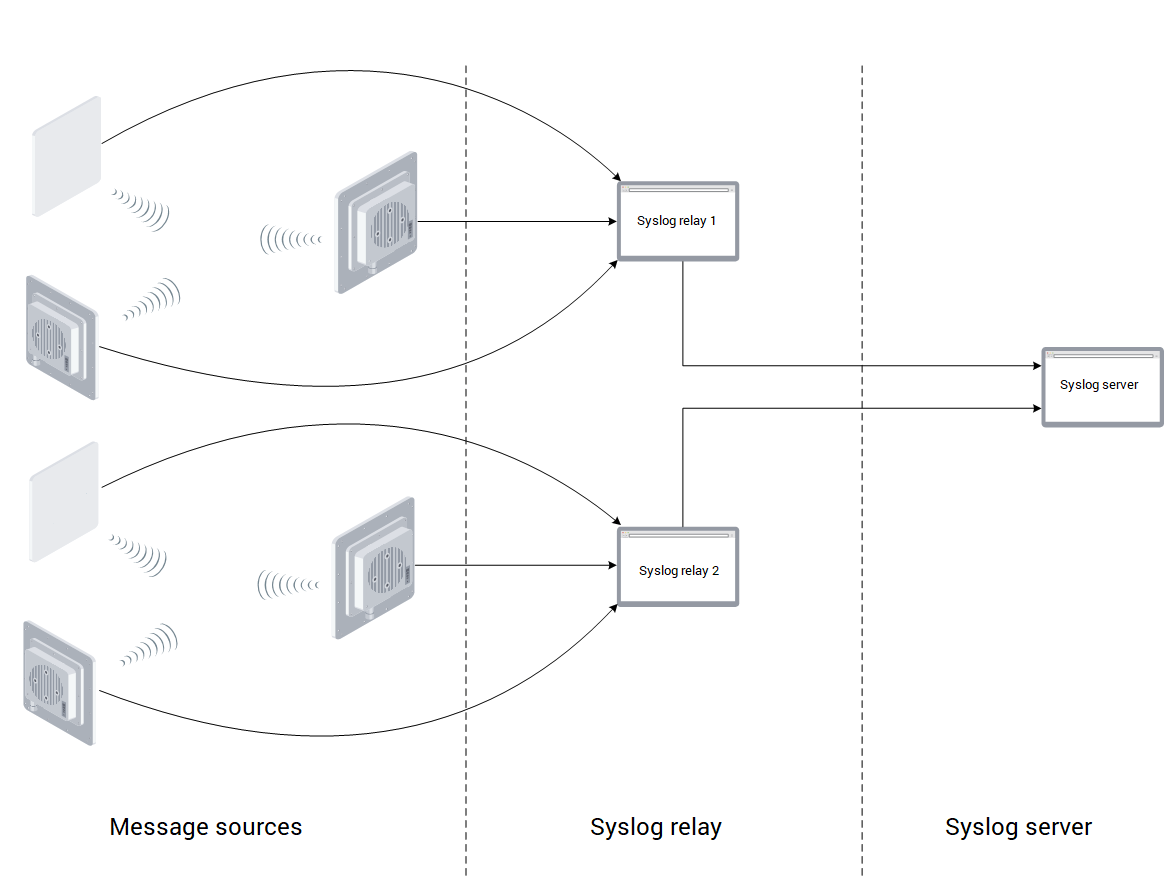 Using a syslog server as a central log storage has the following advantages:
1. Logs from network devices are stored centrally: working with logs requires connecting to only one device (the syslog server).
2. Logs are stored in non-volatile memory: rebooting network devices or the syslog server does not clear the logs.
3. Popular syslog server implementations offer additional functionality, such as:
1. message search;
2. message filtering;
3. displaying multiple logs as a single chronology;
4. the ability to configure message analysis and automatic responses to them when conditions are triggered, such as sending notifications.
### Syslog messages
Messages in the syslog protocol include the following attributes:
* severity level;
* message source;
* timestamp;
* message text.
### Severity level
This attribute takes one of the following values:
| Code | Severity | Comment |
| ---- | ------------- | ----------------------------------------- |
| 0 | Emergency | The system is unusable |
| 1 | Alert | The system requires immediate attention |
| 2 | Critical | The system state is critical |
| 3 | Error | Error messages |
| 4 | Warning | Warning of possible problems |
| 5 | Notice | Message about normal but important events |
| 6 | Informational | Informational message |
| 7 | Debug | Debug message |
### Message source
This attribute identifies the internal system component that generated the message. According to recommendations, this attribute accepts the following values:
| Code | Source of the message |
| ----- | ------------------------------------------------------------------------- |
| 0 | Operating system kernel |
| 1 | User software |
| 2 | Mail system |
| 3 | System services |
| 4 | Security messages |
| 5 | Custom messages |
| 6 | Printing subsystem |
| 7 | Newsgroup subsystem |
| 8 | File copy subsystem |
| 9 | Time service |
| 10 | Security messages |
| 11 | FTP service |
| 12 | NTP subsystem |
| 13 | Audit log |
| 14 | Emergency log |
| 15 | Time service |
| 16-23 | Undefined: Allowed for use by system manufacturers for their own purposes |
### Timestamp
Timestamp of the incident's occurrence.
### Message text
The text of the incident message. The syslog protocol does not formalize the attribute value.
### Syslog message transmission
The syslog protocol and its extensions are described in more than 10 RFCs. According to these documents, messages can be sent over UDP or TCP, in both cleartext and encrypted form.
The disadvantage of such a wide variety of extensions is ensuring compatibility between network devices and central storage. Astrawireless devices implement cleartext message transmission over UDP (port 541 by default).
## Using NEXT as a syslog server
Using a syslog server as a central log storage has the following advantages:
1. Logs from network devices are stored centrally: working with logs requires connecting to only one device (the syslog server).
2. Logs are stored in non-volatile memory: rebooting network devices or the syslog server does not clear the logs.
3. Popular syslog server implementations offer additional functionality, such as:
1. message search;
2. message filtering;
3. displaying multiple logs as a single chronology;
4. the ability to configure message analysis and automatic responses to them when conditions are triggered, such as sending notifications.
### Syslog messages
Messages in the syslog protocol include the following attributes:
* severity level;
* message source;
* timestamp;
* message text.
### Severity level
This attribute takes one of the following values:
| Code | Severity | Comment |
| ---- | ------------- | ----------------------------------------- |
| 0 | Emergency | The system is unusable |
| 1 | Alert | The system requires immediate attention |
| 2 | Critical | The system state is critical |
| 3 | Error | Error messages |
| 4 | Warning | Warning of possible problems |
| 5 | Notice | Message about normal but important events |
| 6 | Informational | Informational message |
| 7 | Debug | Debug message |
### Message source
This attribute identifies the internal system component that generated the message. According to recommendations, this attribute accepts the following values:
| Code | Source of the message |
| ----- | ------------------------------------------------------------------------- |
| 0 | Operating system kernel |
| 1 | User software |
| 2 | Mail system |
| 3 | System services |
| 4 | Security messages |
| 5 | Custom messages |
| 6 | Printing subsystem |
| 7 | Newsgroup subsystem |
| 8 | File copy subsystem |
| 9 | Time service |
| 10 | Security messages |
| 11 | FTP service |
| 12 | NTP subsystem |
| 13 | Audit log |
| 14 | Emergency log |
| 15 | Time service |
| 16-23 | Undefined: Allowed for use by system manufacturers for their own purposes |
### Timestamp
Timestamp of the incident's occurrence.
### Message text
The text of the incident message. The syslog protocol does not formalize the attribute value.
### Syslog message transmission
The syslog protocol and its extensions are described in more than 10 RFCs. According to these documents, messages can be sent over UDP or TCP, in both cleartext and encrypted form.
The disadvantage of such a wide variety of extensions is ensuring compatibility between network devices and central storage. Astrawireless devices implement cleartext message transmission over UDP (port 541 by default).
## Using NEXT as a syslog server
 Starting with NEXT v2.0, the system supports syslog server functionality for Astrawireless devices. The syslog server in NEXT supports the following features:
1. Central storage of Astrawireless device logs for 30 days.
2. Shared viewing of event logs from up to 10 devices.
3. Search for event log entries:
* by substring;
* by regular expression.
4. Filter event log entries:
* by time;
* by substring;
* by regular expression;
* by message severity.
5. Automatic updating of event logs in real time.
6. Export of event logs as a text file.
7. Manage syslog server status: enable/disable.
### Configuring NEXT as a Syslog server
To use NEXT as a syslog server, configure the following:
1. Activate the syslog server in NEXT (see the NEXT user documentation).
2. Specify the syslog server address in the device configuration using the following command (192.168.110.50 is the IP address of NEXT):
```
system log 192.168.110.50
```
## General recommendations
The scenarios and functionality discussed in this article allow us to formulate the following recommendations:
1. A dedicated syslog server should be allocated in the network infrastructure for central storage of logs. This will allow for enhanced functionality when analyzing messages and will allow for long-term storage with minimal risk of loss.
2. If central event log storage is not possible, it is recommended to use high-performance Astrawireless devices with power redundancy for storage. In this case, device logs will be stored on a single device, which is convenient for incident analysis.
3. Use thefunction of message output to the current terminal during incident resolution in real time.
Starting with NEXT v2.0, the system supports syslog server functionality for Astrawireless devices. The syslog server in NEXT supports the following features:
1. Central storage of Astrawireless device logs for 30 days.
2. Shared viewing of event logs from up to 10 devices.
3. Search for event log entries:
* by substring;
* by regular expression.
4. Filter event log entries:
* by time;
* by substring;
* by regular expression;
* by message severity.
5. Automatic updating of event logs in real time.
6. Export of event logs as a text file.
7. Manage syslog server status: enable/disable.
### Configuring NEXT as a Syslog server
To use NEXT as a syslog server, configure the following:
1. Activate the syslog server in NEXT (see the NEXT user documentation).
2. Specify the syslog server address in the device configuration using the following command (192.168.110.50 is the IP address of NEXT):
```
system log 192.168.110.50
```
## General recommendations
The scenarios and functionality discussed in this article allow us to formulate the following recommendations:
1. A dedicated syslog server should be allocated in the network infrastructure for central storage of logs. This will allow for enhanced functionality when analyzing messages and will allow for long-term storage with minimal risk of loss.
2. If central event log storage is not possible, it is recommended to use high-performance Astrawireless devices with power redundancy for storage. In this case, device logs will be stored on a single device, which is convenient for incident analysis.
3. Use thefunction of message output to the current terminal during incident resolution in real time.